Most owners can tell you their revenue last month. Far fewer can tell you which jobs made money and which ones lost it. That gap is where profit quietly disappears. If you want to see profit by job instead of one big revenue figure, you need to break the number apart and look at each job on its own. This post walks through why total revenue is misleading, what data you actually need, and how a simple dashboard surfaces the jobs that drain your margin.
Why total revenue lies to you
Revenue is a vanity number. It tells you how much money moved, not how much you kept. A $40,000 month feels like a win until you find out three big jobs ran over on labor and barely broke even.
Here is the problem. Total revenue blends everything together. Your best job and your worst job get averaged into one line. The losers hide behind the winners. You feel busy and profitable right up until cash gets tight and you cannot explain why.
Small shops feel this harder than anyone. One bad job is a bigger slice of the month. A single callback, a parts order that doubled, a tech stuck on site for three extra hours. Any of those can flip a job from profit to loss, and the revenue total will never tell you.
The fix is to stop looking at the top line alone and start looking at margin one job at a time.
What profit by job actually means
Profit by job is simple math done consistently. For each job, you take what you charged and subtract what it cost you to do the work.
A clean profit by job calculation pulls in:
- Job revenue. The invoiced amount for that specific job.
- Labor cost. Hours worked times the loaded pay rate for each tech on the job.
- Materials and parts. What you actually paid, not what you marked it up to.
- Subcontractor or rental costs. Anything you paid out to get the job done.
- Direct fees. Permits, dump fees, equipment, travel if you track it.
Subtract those costs from the revenue and you have gross profit for that job. Divide profit by revenue and you have your margin. Do that for every job and the picture changes fast. You stop seeing a blur and start seeing a ranked list. The top jobs you want more of. The bottom jobs you need to fix or fire.
The data you need and where it lives
The good news is you are probably already collecting most of this. The data is just scattered. Pulling it into one place is the real work.
Most owner-run shops have the pieces in two or three systems:
- Field service software holds the job, the invoice, and often the assigned techs and hours. Service Fusion is a common one in the trades.
- Accounting software like QuickBooks holds the costs, vendor bills, and payroll.
- Spreadsheets or notes hold the stuff that never made it into either, which is usually the costs that kill your margin.
The challenge is tying everything back to a single job. Labor needs to map to the right job. A parts receipt needs to land on the job it was bought for. If your costs float around loose, you cannot trust the profit number. So the first step is almost always cleaning up how costs get tagged to jobs at the source. Once the data is consistent, the math is easy.
If you want a deeper look at structuring this kind of reporting, our dashboards and reporting work is built around exactly this problem.
How a dashboard surfaces profit by job
You could run profit by job in a spreadsheet once a quarter. Most owners do not, because it is tedious and it goes stale the moment a new job closes. A dashboard solves both problems by pulling the data automatically and keeping it current.
A good profit by job dashboard does a few things well:
- Pulls revenue and cost data on a schedule so the numbers stay live without anyone exporting reports by hand.
- Calculates margin per job and shows it as both dollars and a percentage.
- Ranks and flags jobs so your lowest margin work rises to the top where you will actually see it.
- Filters by tech, job type, or date so you can spot patterns, not just one-off bad jobs.
That last point matters most. One bad job is bad luck. The same job type losing money every month is a pricing problem. The same tech running long on every visit is a training or scheduling problem. A dashboard turns a pile of jobs into a pattern you can act on.
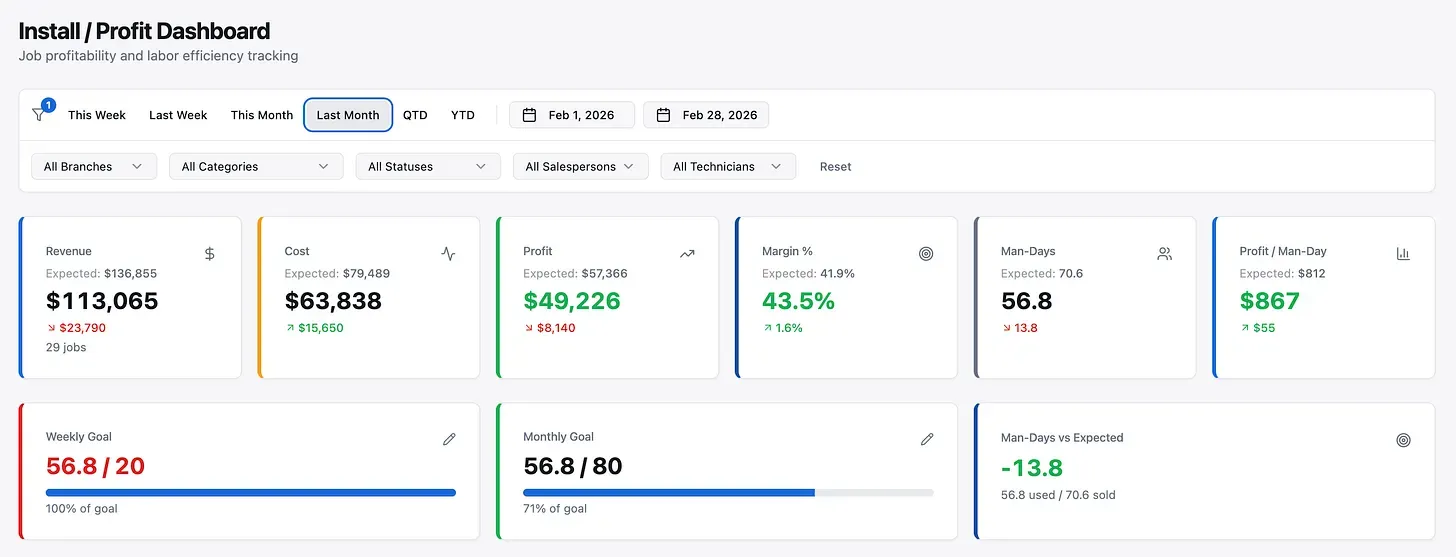
This is the same approach behind every dashboard we build. Connect the systems you already use, calculate the number that matters, and put it somewhere you will look at it. You can see the broader business automation side of that work too, since clean reporting usually starts with cleaning up the data flow.
What owners do once they can see it
Visibility is only useful if it changes a decision. When owners can finally see profit by job, the changes are usually quick and concrete.
Some raise prices on a job type that always runs thin. Some tighten estimates because they were lowballing labor. Some catch that callbacks on one kind of work are eating the margin, then fix the root cause. A few realize a “good” customer has been their least profitable one for a year.
We have seen the same pattern in adjacent work. One shop could not see the shape of its own business until it all landed on one screen: 51 stuck jobs and roughly 1,500 invoices a year, none of it ever looked at as a whole. Profit by job works the same way. The money is already in your data. You just cannot act on what you cannot see.
If you also want the surfacing to trigger action on its own, like flagging a low margin job the moment it closes, that is where AI automation fits in on top of the reporting layer.
Start with one number
You do not need a giant project to begin. Pick one question. Which jobs lost money last month? Answer that honestly and you will already know more than most owners on your block.
From there, it is about making that answer automatic so you never have to dig for it again. We build dashboards for owner-run small businesses across Medina County and greater Akron, and profit by job is one of the most common asks. If you want to stop guessing and start seeing the real number, book a call and we will map out what it would take with the tools you already have. You can also browse more on the blog for related reporting ideas.